
Anything you capture or copy, uploaded to storage you control.
put.gd is a tray app for Linux. Press a key and drag a region, record the screen, or hand it whatever is on the clipboard: files, an image, text. It goes to your S3 bucket or Proton Drive, and the link comes back to the clipboard. Capture uses each desktop's own screenshot service on Cinnamon, GNOME 50 and KDE Plasma 6, on X11 and Wayland.
$ make test
collected 215 items

tests/test_auth.py ........          [  4%]
tests/test_billing.py ..........     [  9%]
tests/test_upload.py ....F.....   [ 13%]
tests/test_webhooks.py .......      [ 16%]
FAILED tests/test_upload.py::test_retry
  AssertionError: expected 201, got 503
1 failed, 214 passed in 8.31s
What happens between the key and the link
Every source, including a finished recording, goes through the same five stops. The windows below are the current nightly build on the lab desktops, not mockups.
-
Trigger
A global hotkey, the tray menu, or
putgd-cli action.invoke. Three keys are bound out of the box and every action can be rebound. Each row in Settings reports whether the desktop actually granted the key, because on Wayland that is not a given.- CtrlShift1
- Capture region
- CtrlShift2
- Capture window
- CtrlShift3
- Capture desktop
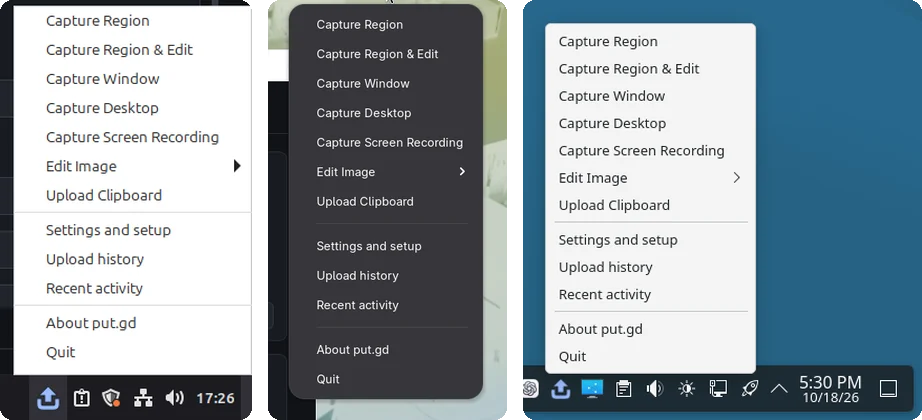
The same tray menu on Cinnamon, GNOME and Plasma. -
Capture
A region drawn over the live desktop, the focused window with its frame, every enabled monitor, whatever is on the clipboard (files, an image, or text), or a screen recording. Cinnamon is captured through the compositor's screenshot service, GNOME through a small Shell extension the packages install, and Plasma through KWin's ScreenShot2 with layer-shell overlays. There is no portal picker for regions and no XWayland workaround.
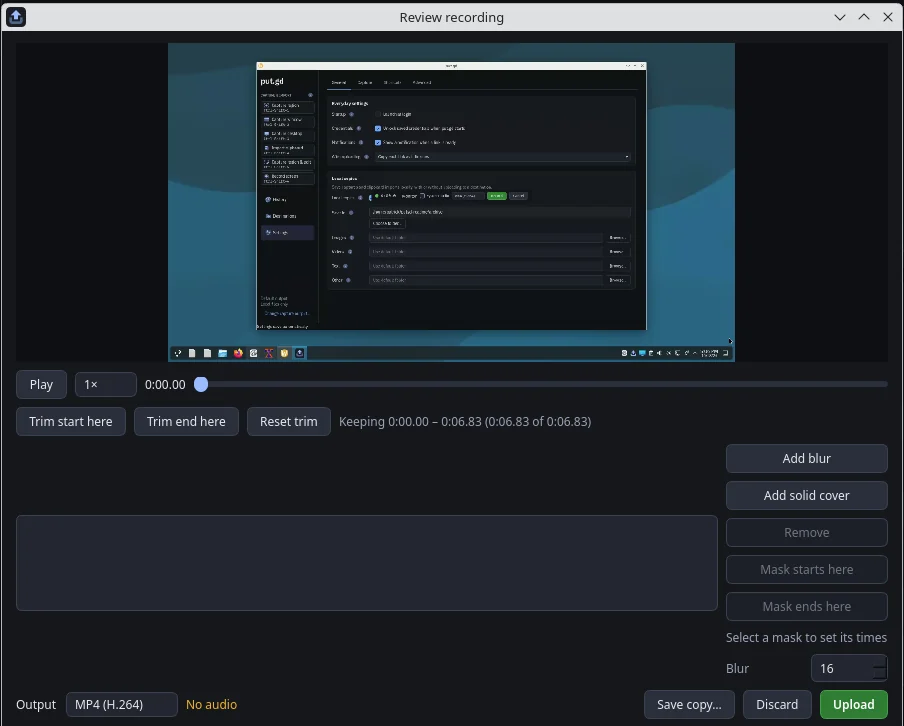
Stop on a recording opens this review. Trim, add timed blur or solid masks, choose MP4, WebM, GIF or WebP, then Upload or Discard. -
Edit, if you want to
Capture region & edit opens an editor before anything is stored. Redact removes the covered pixels from the file rather than blurring them. Crop, arrow, rectangle, highlight and text, with undo and a 100% zoom to check edges. Nothing leaves the machine until you press Upload, and Cancel stores nothing.
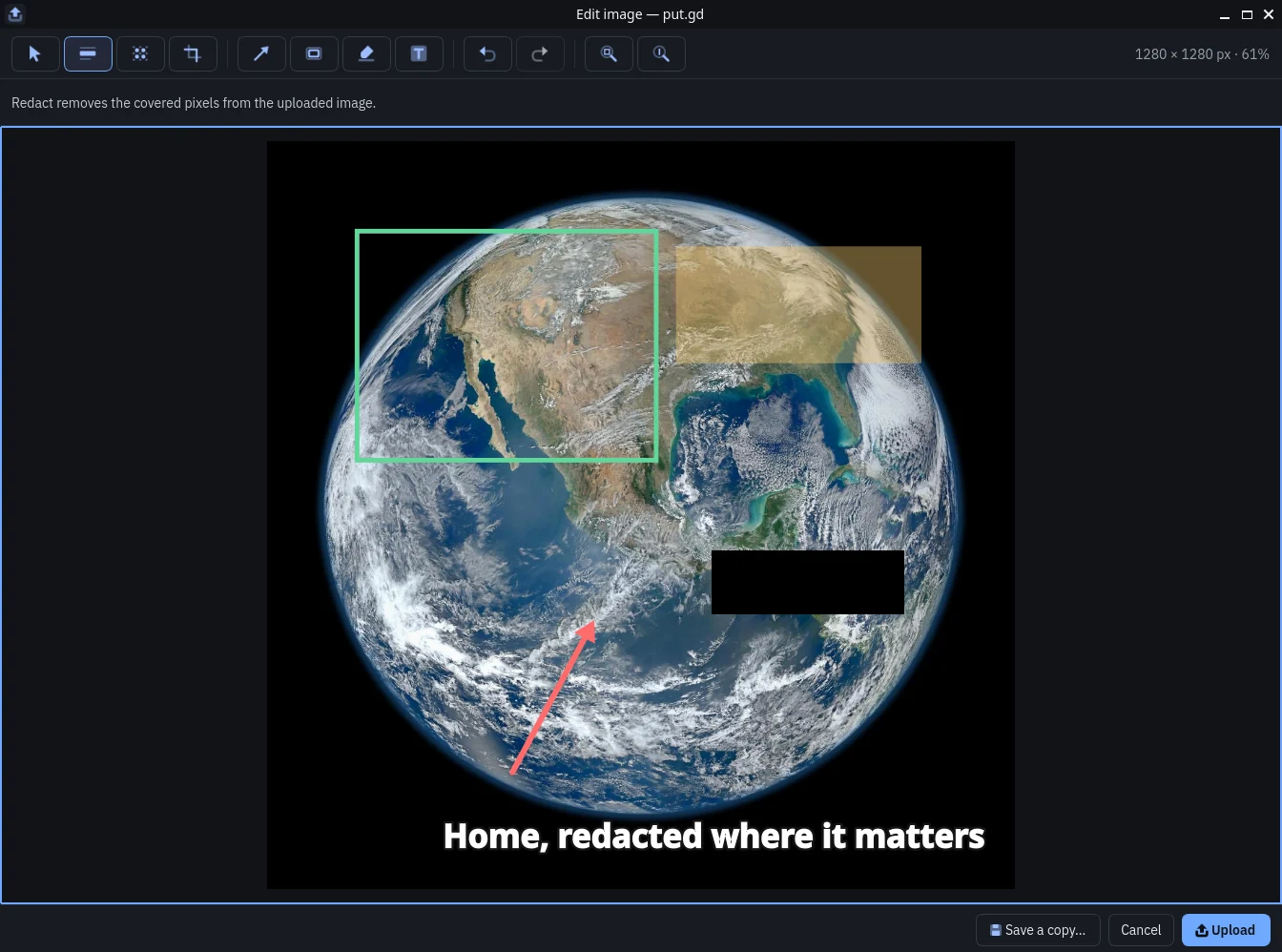
The editor on GNOME. The black box is a redaction; those pixels are gone from the upload. -
Upload
Any S3-compatible bucket with your own link domain, or Proton Drive through the official SDK. Public-read or private is chosen per destination and per action; a private upload makes no link and leaves the clipboard alone. Credentials live in the system keychain or for the session only, never in a file, and the CLI refuses them on the command line. Test connection uploads a sample object, checks the public link, then deletes it.
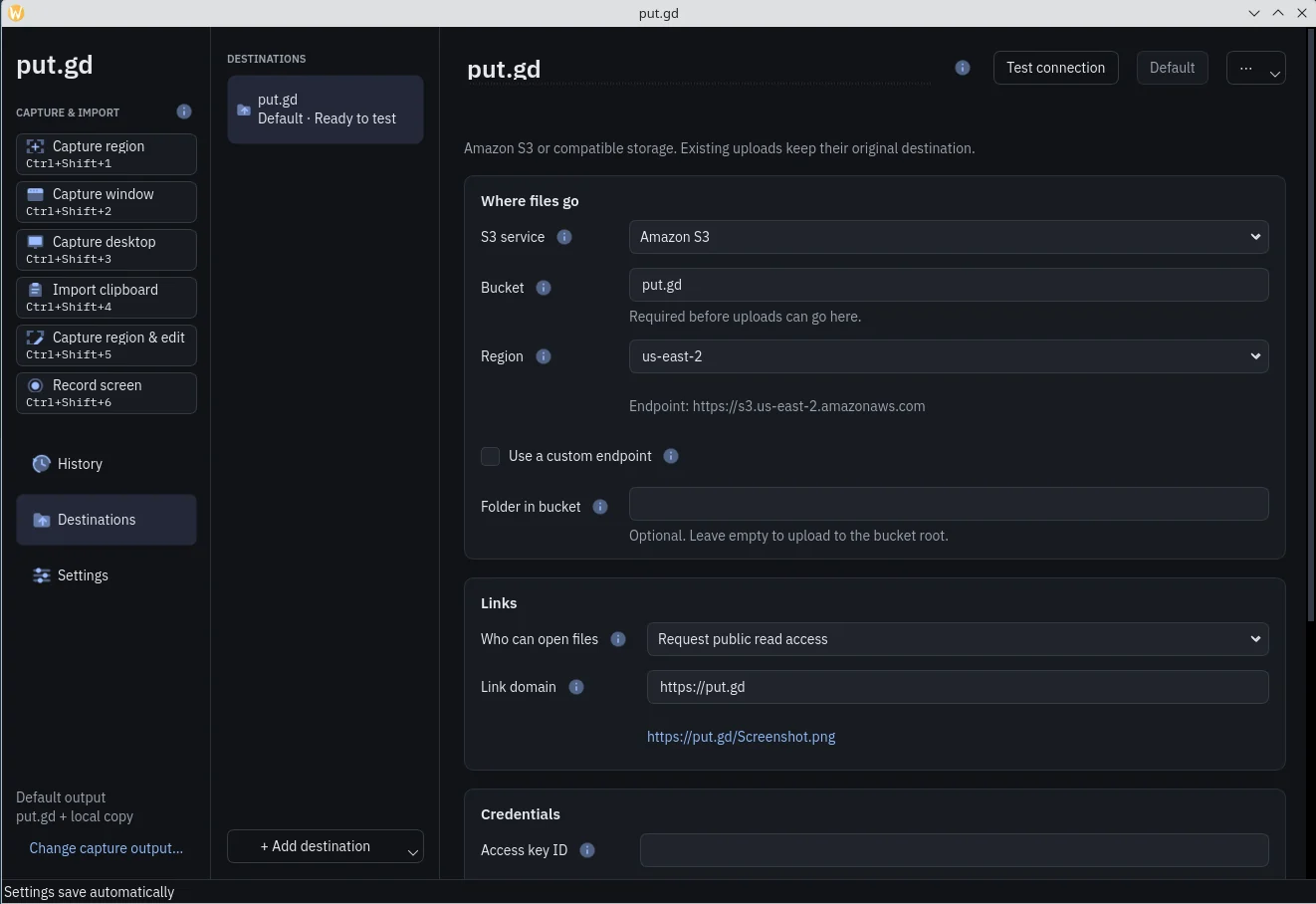
A destination: bucket, region, link domain and access policy up front; endpoints, addressing and timeouts under Advanced. -
Receipt
The link is on the clipboard, a notification says so, and History gets an entry with a thumbnail, the size and the outcome. History works offline: it never lists or fetches anything from the bucket to show you what you have. From there you can copy the link again, re-edit the local copy, or delete the remote object after reviewing exactly what will be removed. An interrupted upload is recorded as unknown, never as a made-up URL.
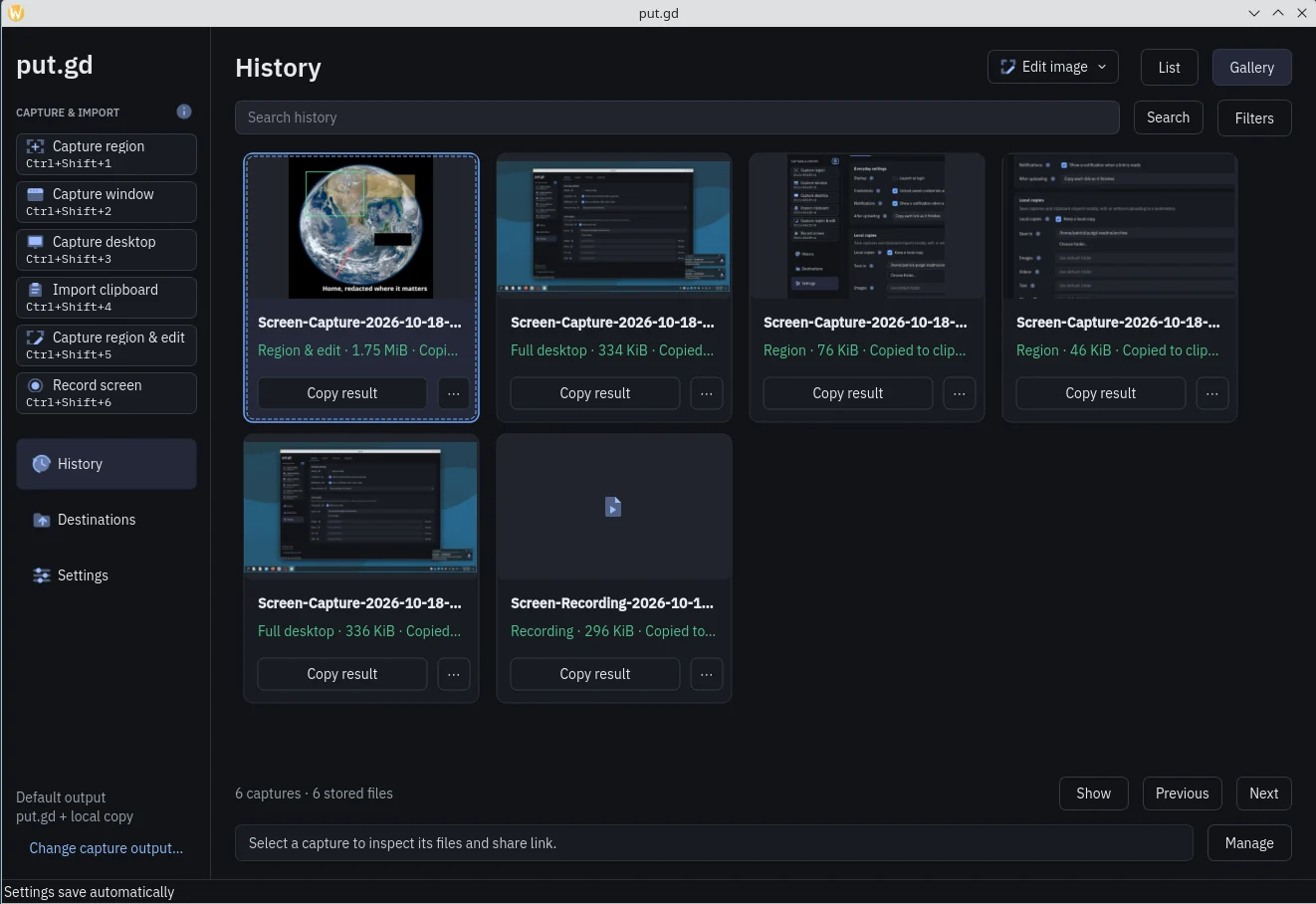
History in gallery view. The list view has the same rows with search and filters.
The same actions from a script
The resident speaks newline-delimited JSON over an owner-only Unix socket. The tray, the windows and putgd-cli all call the same methods, so anything you can click, a script can do. Every call returns an operation ID you can inspect for the phase, the bytes, the link and the outcome.
An optional MCP helper wraps the CLI with typed tools for Claude Code, Claude Desktop or any stdio MCP client.
$ putgd-cli capabilities
# what this desktop actually supports
$ putgd-cli action.invoke '{"action":"region"}'
# returns an operation id right away
$ putgd-cli operation.inspect '{"id":"OPERATION-ID"}'
# phase, bytes, link, outcome
$ putgd-cli history.list '{"limit":5,"category":"images"}'
$ putgd-cli recording.prepare '{"target":{"kind":"region"},"format":"mp4"}'
Install
x86_64 packages for each supported release are on the releases page, with SHA256SUMS and build receipts next to them.
| You run | File | Qt | Download |
|---|---|---|---|
| Ubuntu 24.04, Linux Mint 22 | putgd-VERSION-ubuntu24.04-x86_64.deb | distro Qt 6.4 | Download |
| Ubuntu 26.04, Kubuntu 26.04 | putgd-VERSION-ubuntu26.04-x86_64.deb | distro Qt and LayerShellQt | Download |
| Debian 13 | putgd-VERSION-debian13-x86_64.deb | distro Qt 6.8 and LayerShellQt | Download |
| Fedora 44 | putgd-VERSION-fedora44-x86_64.rpm | distro Qt and LayerShellQt | Download |
| Anything else with glibc 2.39 or newer | putgd-VERSION-x86_64.AppImage | bundled Qt 6.8.3 | Download |
Debian, Ubuntu and Mint
sudo apt install ./putgd-*.debFedora
sudo dnf install ./putgd-*.rpmAppImage
chmod +x putgd-*.AppImage && ./putgd-*.AppImageFor scripts and docs, https://app.put.gd/dl/stable/fedora44 always redirects to the current stable RPM. The same pattern works for ubuntu24.04, ubuntu26.04, debian13, appimage and checksums, and with nightly in place of stable.
Each DEB installs only on the release it names, because it links that release's FFmpeg. On GNOME 50, run gnome-extensions enable putgd@put.gd once and log back in so the capture extension loads. Then add a destination under Destinations, store the credentials in the keychain, and press CtrlShift1.
Details
- Desktops
- Cinnamon on X11; GNOME 50 and KDE Plasma 6 on Wayland
- Storage
- Any S3-compatible bucket; Proton Drive (experimental)
- Recording formats
- MP4 (H.264, H.265), WebM (VP9), GIF, animated WebP; VA-API and NVENC where available
- Idle footprint
- One resident process; under 40 MiB with helpers started on demand
- Network
- Talks to your storage endpoint and nothing else
- Built with
- C++20 and Qt 6, MIT licensed